What Is EXIF Data — and How to Remove It from Any Photo
EXIF is a hidden block of camera data written into every JPEG your phone takes. It is useful for photographers and quietly dangerous for everyone else. Here is exactly what is inside, who can see it, and how to strip it in seconds.
What EXIF actually contains
EXIF (Exchangeable Image File Format) is a standard that lets cameras embed capture details directly in the photo file. A typical smartphone JPEG carries:
- Device and software. Phone model, lens, camera app — sometimes serial numbers.
- Exact timestamp. Down to the second, in your local time.
- GPS coordinates. If location services are on for your camera, the precise map pin (see our GPS guide).
- Shooting settings. ISO, shutter speed, aperture, flash — harmless alone, but they can fingerprint which device took which photo.
- A thumbnail of the original. In rare cases an embedded preview survived edits to the main image, which has embarrassed more than one newsroom.
Who should care about EXIF
Anyone who shares photos outside big social networks. Sellers on marketplaces, people using dating apps, parents posting in group chats, freelancers sending work samples, and journalists protecting sources all share one risk: the file says more than the picture does. Screenshots usually escape with less baggage, but photos received by email, AirDrop or cloud links carry their EXIF intact.
Check what your photos reveal
- On a phone: open a photo, tap the (i) or Details button — you will see device, date and often a small map.
- On Windows: right-click a file, choose Properties → Details.
- On macOS: open the file in Preview, then Tools → Show Inspector → EXIF.
Anything you see there, a stranger can see too once they have the file.
Remove EXIF in one drop
The fastest route is the PhotoWipe tool at the top of our home page: drop the file, download the clean version, done — the wipe is lossless because only the metadata blocks are removed.
Prefer manual routes? iOS shares a "no location" copy when you tap Options before sharing, Android has a similar Remove location data toggle on many models, and both Windows and macOS let you remove properties per file. Those work — they are just slower for more than a couple of photos, and the exact menu location changes between OS versions.
Does wiping hurt image quality?
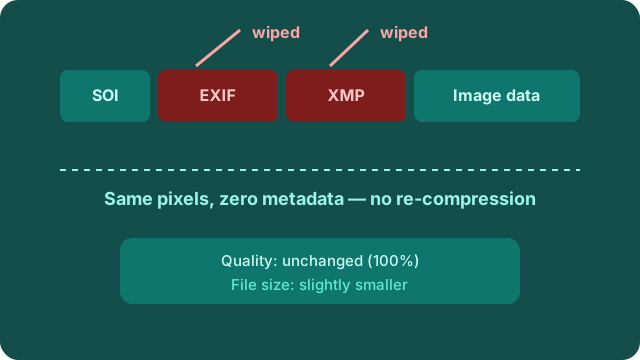
No — and this is the part most people assume wrong. PhotoWipe never re-compresses your image. It copies the picture data byte for byte and cuts the metadata sections out of the container. The result is visually identical and usually a little smaller. That is also why wiped files cannot be "un-wiped": the data is gone, not hidden.
Frequently asked questions
Does removing EXIF change how my photo looks?
No. EXIF lives in a separate block of the file, next to — not inside — the image data. Cutting it leaves every pixel identical.
Do Facebook and Instagram strip EXIF for me?
Most large social apps remove metadata on upload, but files shared by email, chat attachments, AirDrop or cloud links keep it. Wipe before sharing anywhere you cannot verify.
Can EXIF be recovered after wiping?
No. The metadata blocks are removed from the file, not hidden. Once gone, there is nothing left to recover.
Next steps: remove GPS location from photos or get unlimited wipes. If you only remember one thing: the photo and its metadata are two separate things inside one file — you can always throw away one and keep the other.